Datamesh OData Service Root (Entity Set Discovery) (2.0.0)
Download OpenAPI specification:
This document describes the OData service root endpoints for both v1 and v2 versions of the OData service.
The service root is typically the entry point you call to discover what entity sets are available in the service. The response contains an array of objects, each representing an entity set:
- name: The entity set name as exposed by the OData service (collection endpoint).
- url: The relative path you use to query that entity set (for example:
/fleet,/mcc,/asset).
In other words, this endpoint helps clients dynamically discover the navigation surface of the API without hardcoding entity set names.
Version Differences:
- v1: Exposes entity sets from classic DRM:
fleet,clients,mcc,asset,documents - v2: Exposes entity sets from DRM NG:
fleet,mcc
Aircraft maintenance, lease management, and operational data are generated across multiple enterprise systems such as AMOS, AVIATAR MRO Management, mobile applications, and desktop applications. These systems are optimized for operational workflows but do not provide a unified, standardized view of data for downstream consumers.
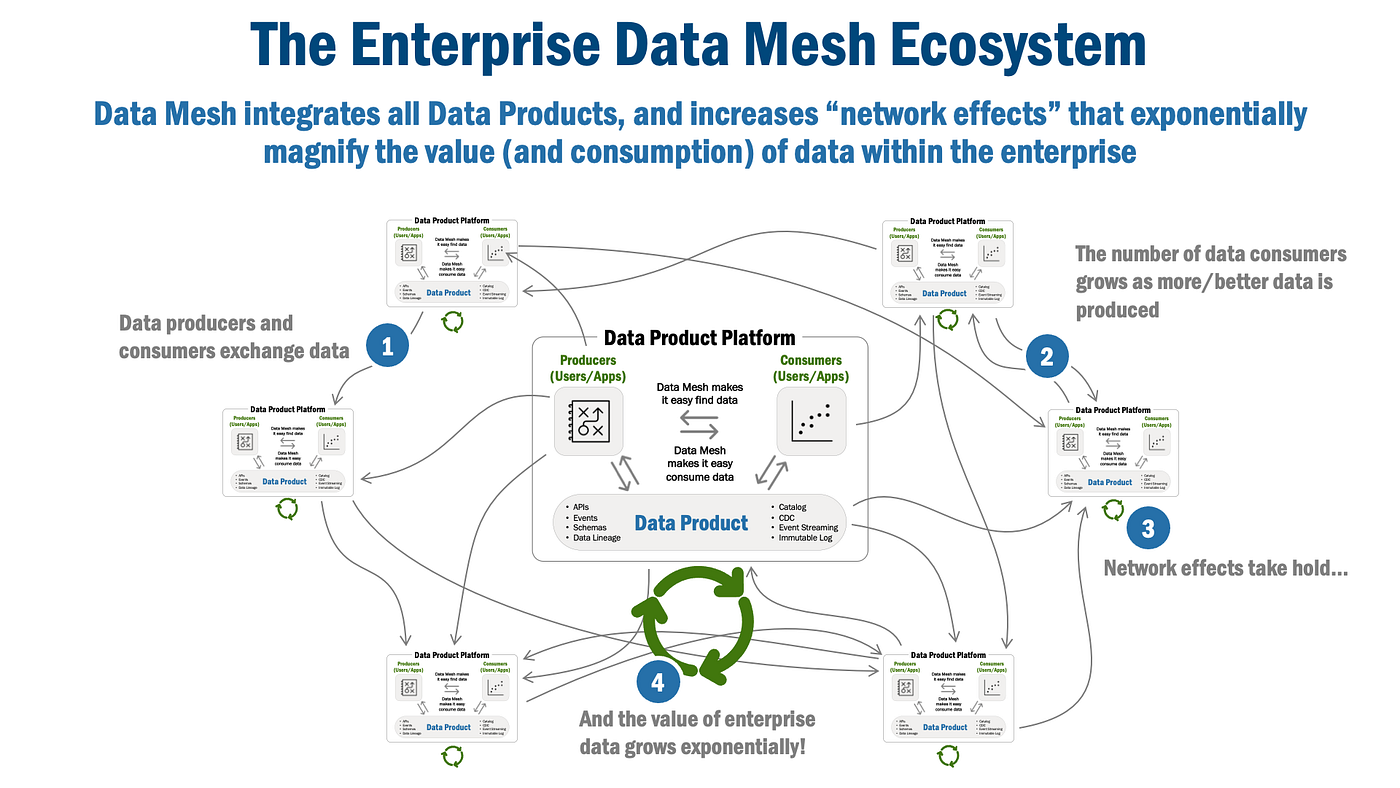
DataMesh acts as a centralized integration and data access layer that bridges the gap between operational systems and business consumers. It enables consistent data synchronization, transformation, storage, and exposure through standardized APIs, reducing the complexity of direct system-to-system integrations.
How DataMesh Works
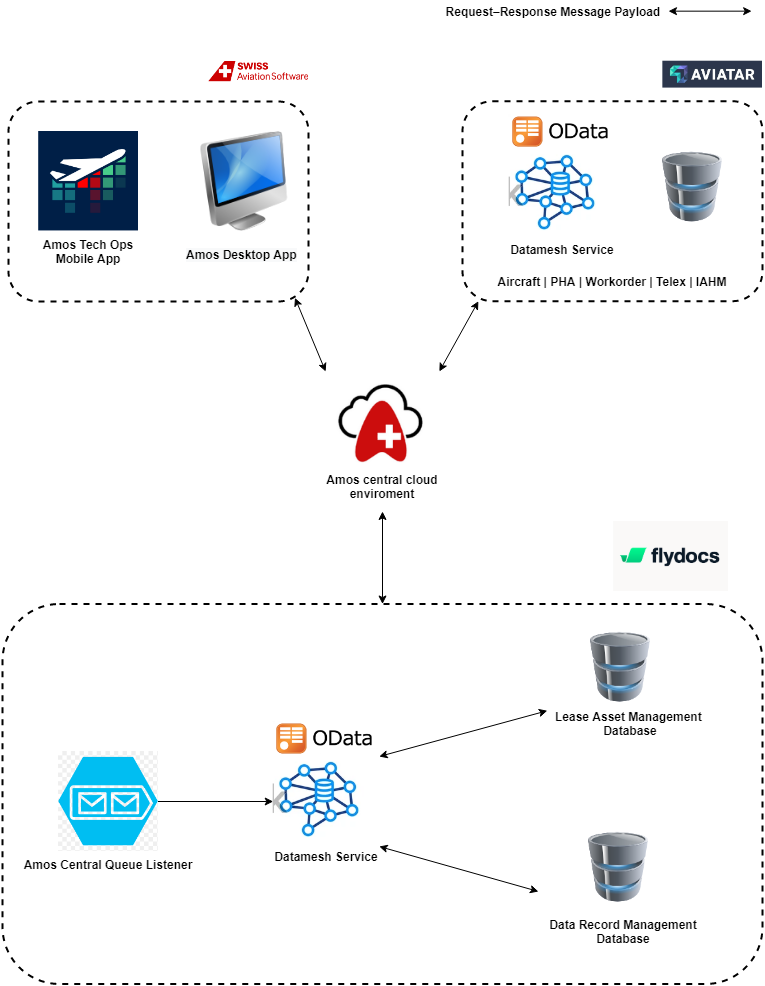
- Maintenance and asset-related events are generated within AMOS and AVIATAR applications.
- These events are routed through the AMOS Central Cloud Environment using a message-based communication model.
- The AMOS Central Queue Listener consumes incoming messages from the cloud platform.
- DataMesh processes, validates, enriches, and transforms the incoming data into a standardized data model.
- Processed information is stored in dedicated databases:
- Lease Asset Management Database
- Data Record Management Database
- DataMesh exposes the consolidated data through OData APIs, allowing internal and external consumers to access information consistently and efficiently.
Key Benefits of DataMesh
- Single Source of Truth for lease asset and maintenance-related data
- Decouples Source Systems from downstream consumers
- Event-Driven Architecture for near real-time data synchronization
- Standardized OData APIs for easy data access and integration
- Scalable Integration Platform that can onboard additional systems with minimal impact
- Improved Data Governance through centralized processing and storage
Architecture Overview
Why and How DataMesh Enables Seamless Data Integration Across the Aviation Ecosystem
DataMesh serves as the central integration and data distribution platform, consuming operational data from AMOS and AVIATAR, transforming it into a standardized model, persisting it in domain-specific repositories, and exposing it through OData APIs for downstream consumers.
- Authenticate: Obtain an access token using the OAuth 2.0 refresh token flow
Download the Postman collection and watch the setup guide video
Discover Available Services: Start by calling the service root endpoint (
/v1or/v2) to discover available entity setsExplore Metadata: Use the
$metadataendpoint to understand entity structures and propertiesQuery Data: Use OData query options such as
$filter,$select,$expand,$orderby,$top, and$skipto retrieve data
- v1: Legacy version with broader entity set coverage (fleet, clients, mcc, asset, documents)
- v2: Modern version focused on core operations (fleet, mcc)
- Query aircraft tail information
- Retrieve work packages and work orders
- Filter and expand related entities
- Access maintenance documentation
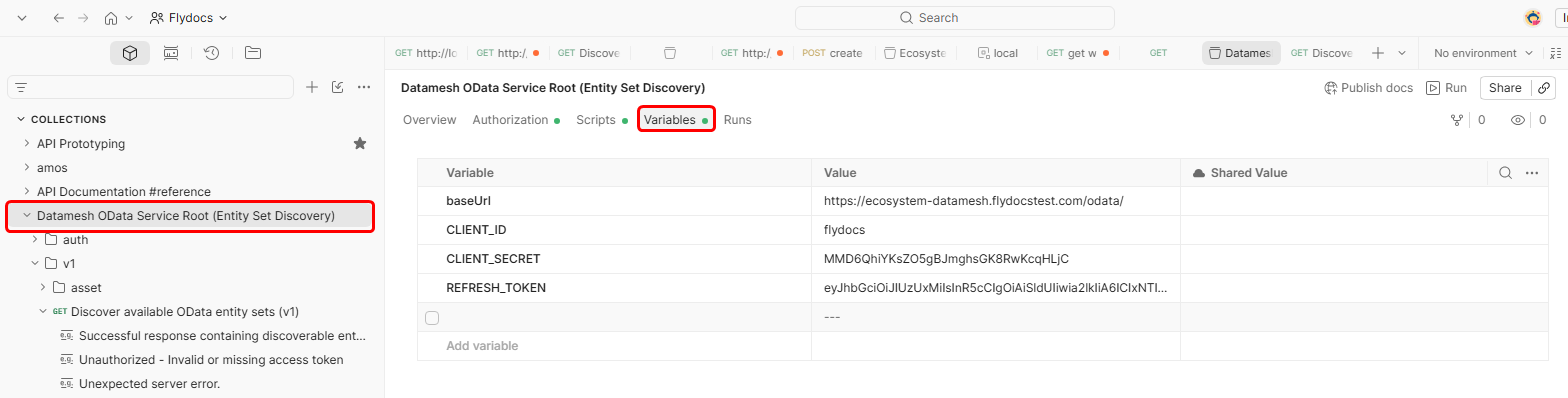
The following environment variables can be used to configure API requests:
{{CLIENT_ID}}: OAuth 2.0 client identifier (e.g.,flydocs){{CLIENT_SECRET}}: OAuth 2.0 client secret (e.g.,MMD6QhiYKsZO5gBJmghsGK8RwKcqHLjC){{REFRESH_TOKEN}}: Valid refresh token to obtain access tokens
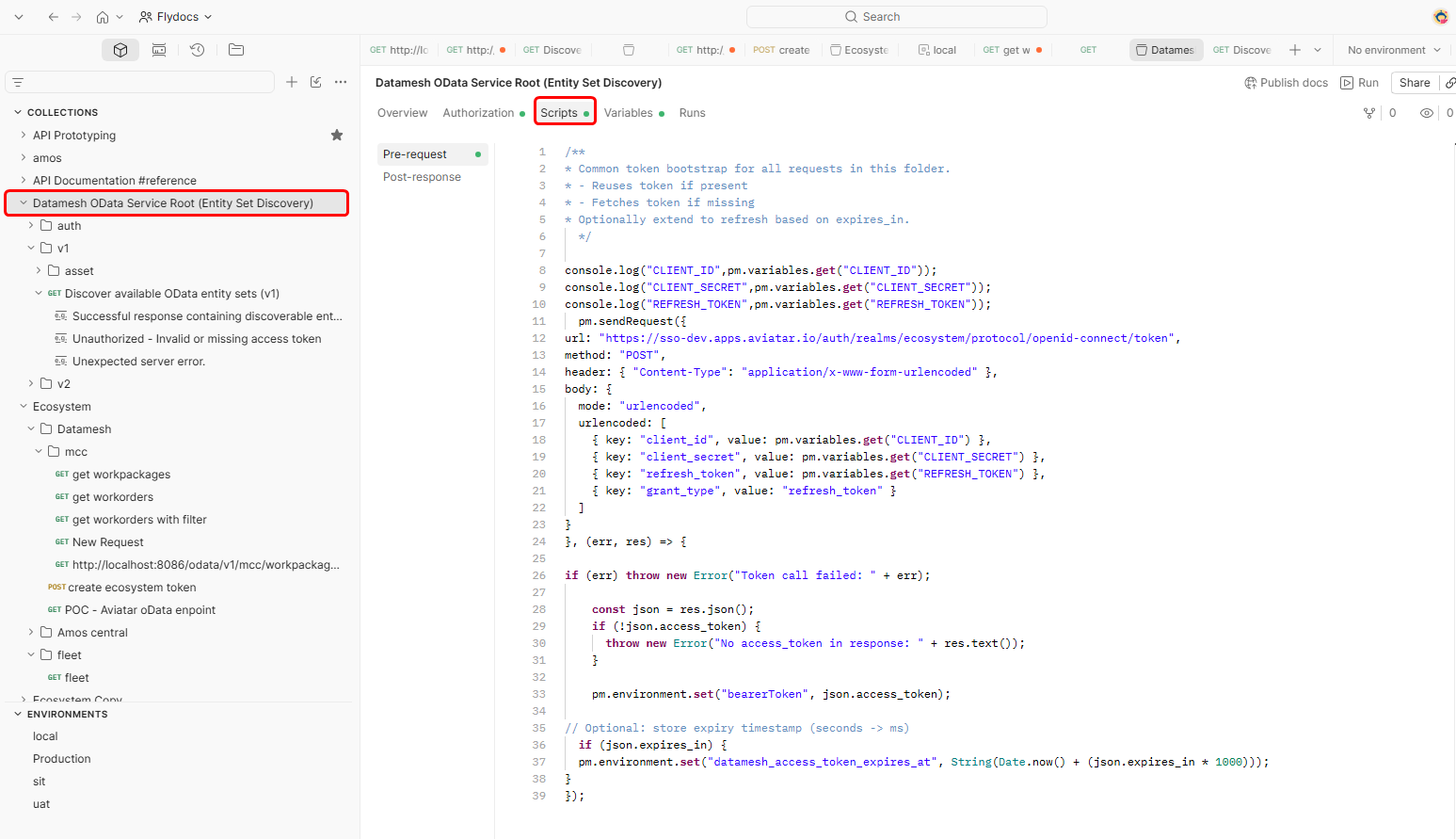
/**
* Common token bootstrap for all requests in this folder.
* - Reuses token if present
* - Fetches token if missing
* Optionally extend to refresh based on expires_in.
  */
  pm.sendRequest({
url: "https://sso-dev.apps.aviatar.io/auth/realms/ecosystem/protocol/openid-connect/token",
method: "POST",
header: { "Content-Type": "application/x-www-form-urlencoded" },
body: {
  mode: "urlencoded",
  urlencoded: [
    { key: "client_id", value: pm.variables.get("CLIENT_ID") },
    { key: "client_secret", value: pm.variables.get("CLIENT_SECRET") },
    { key: "refresh_token", value: pm.variables.get("REFRESH_TOKEN") },
    { key: "grant_type", value: "refresh_token" }
  ]
}
}, (err, res) => {

if (err) throw new Error("Token call failed: " + err);

    const json = res.json();
    if (!json.access_token) {
      throw new Error("No access_token in response: " + res.text());
    }

    pm.environment.set("bearerToken", json.access_token);

// Optional: store expiry timestamp (seconds -> ms)
  if (json.expires_in) {
  pm.environment.set("datamesh_access_token_expires_at", String(Date.now() + (json.expires_in * 1000)));
}
});
Get Access Token
Obtain an access token using the OAuth 2.0 refresh token flow.
This endpoint is used to authenticate and retrieve a bearer token required for accessing all API endpoints.
Authentication Flow:
- Send a POST request to the token endpoint with your credentials
- Receive an access token and refresh token in the response
- Include the access token in the Authorization header for subsequent API requests
- Refresh the token before it expires using the refresh token
Example Usage:
curl -X POST {{SSO_URL}}/auth/realms/ecosystem/protocol/openid-connect/token \
  -H "Content-Type: application/x-www-form-urlencoded" \
  -d "client_id={{CLIENT_ID}}" \
  -d "client_secret={{CLIENT_SECRET}}" \
  -d "refresh_token={{REFRESH_TOKEN}}" \
  -d "grant_type=refresh_token"
Authorizations:
Request Body schema: application/x-www-form-urlencodedrequired
| client_id required | string OAuth 2.0 client identifier |
| client_secret required | string OAuth 2.0 client secret |
| refresh_token required | string Valid refresh token to obtain a new access token |
| grant_type required | string Value: "refresh_token" OAuth 2.0 grant type |
Responses
Response samples
- 200
- 400
- 401
{- "access_token": "eyJhbGciOiJSUzI1NiIsInR5cCI6IkpXVCJ9.eyJzdWIiOiIxMjM0NTY3ODkwIiwibmFtZSI6IkpvaG4gRG9lIiwiaWF0IjoxNTE2MjM5MDIyfQ.SflKxwRJSMeKKF2QT4fwpMeJf36POk6yJV_adQssw5c",
- "expires_in": 3600,
- "refresh_token": "eyJhbGciOiJIUzUxMiIsInR5cCI6IkpXVCJ9.eyJzdWIiOiIxMjM0NTY3ODkwIiwibmFtZSI6IkpvaG4gRG9lIiwiaWF0IjoxNTE2MjM5MDIyfQ.SflKxwRJSMeKKF2QT4fwpMeJf36POk6yJV_adQssw5c",
- "token_type": "Bearer",
- "refresh_expires_in": 1800,
- "scope": "openid profile email"
}Discover available OData entity sets (v1)
Returns the OData service root document for version 1. Use this endpoint as the first step in client workflows to enumerate the entity sets exposed by the service.
Available entity sets in v1:
fleet: Fleet management data (Aircraft, Engine, APU, Gears etc)clients: Client informationmcc: Maintenance Control Center data (WorkPackages, Workorders)asset: Asset management datadocuments: Document management data
Typical usage:
- Call the service root (
/v1) to retrieve entity set names and relative URLs. - Select an entity set you want to work with (for example:
asset). - Follow the discovered
urlto issue OData queries (commonly including$metadata,$select,$filter,$orderby, and paging options).
The response format follows OData conventions. The value array lists entity sets, while
@odata.context provides context information for OData responses.
Authorizations:
Responses
Response samples
- 200
- 401
- 500
{- "@odata.context": "/",
- "value": [
- {
- "name": "fleet",
- "url": "fleet"
}, - {
- "name": "clients",
- "url": "clients"
}, - {
- "name": "mcc",
- "url": "mcc"
}, - {
- "name": "asset",
- "url": "asset"
}, - {
- "name": "documents",
- "url": "documents"
}
]
}Get metadata for the Asset service area
Retrieves the $metadata document for the asset portion of the OData service.
Authorizations:
Responses
Response samples
- 200
{- "$Version": "4.01",
- "assetManagement": {
- "CsValuesPriority": {
- "$Kind": "EnumType",
- "$IsFlags": false,
- "$UnderlyingType": "Edm.Int32",
- "SIW": "0",
- "DEFAULT": "1",
- "LOW": "2",
- "MEDIUM": "3",
- "HIGH": "4"
}, - "EnumDynamicFieldsCentreType": {
- "$Kind": "EnumType",
- "$IsFlags": false,
- "$UnderlyingType": "Edm.Int32",
- "ENGINE_CENTRE": "0",
- "GENERAL_COMPONENT": "1",
- "LANDING_GEAR_CENTRE": "2",
- "AIRCRAFT_CENTRE": "3"
}, - "DbStatus": {
- "$Kind": "EnumType",
- "$IsFlags": false,
- "$UnderlyingType": "Edm.Int32",
- "Y": "0",
- "N": "1"
}, - "EnumDynamicFieldsFilterType": {
- "$Kind": "EnumType",
- "$IsFlags": false,
- "$UnderlyingType": "Edm.Int32",
- "NONE": "0"
}, - "LiveFieldsFilterType": {
- "$Kind": "EnumType",
- "$IsFlags": false,
- "$UnderlyingType": "Edm.Int32",
- "BASE_LOCATIONS": "0",
- "NONE": "1",
- "LIST_OF_VALUES": "2",
- "FREE_TEXT": "3",
- "DATE_PICKER": "4"
}, - "CsValuesType": {
- "$Kind": "EnumType",
- "$IsFlags": false,
- "$UnderlyingType": "Edm.Int32",
- "AIRCRAFT_CENTRE": "0"
}, - "LiveFieldsType": {
- "$Kind": "EnumType",
- "$IsFlags": false,
- "$UnderlyingType": "Edm.Int32",
- "ENGINE_CENTRE": "0",
- "AIRCRAFT_CENTRE": "1",
- "GENERAL_COMPONENT": "2",
- "APU_CENTRE": "3",
- "LANDING_GEAR_CENTRE": "4"
}, - "MaintenanceCentreViewType": {
- "$Kind": "EnumType",
- "$IsFlags": false,
- "$UnderlyingType": "Edm.Int32",
- "AIRCRAFT_CENTRE": "0",
- "GENERAL_COMPONENT": "1",
- "ENGINE_CENTRE": "2",
- "LANDING_GEAR_CENTRE": "3"
}, - "MajorAssemblyReturnCondition": {
- "$Kind": "EntityType",
- "$Key": [
- "Id"
], - "ClientId": {
- "$Type": "Edm.Int32"
}, - "LeaseReturnDate": {
- "$Type": "Edm.Date"
}, - "Msn": {
- "$Type": "Edm.String",
- "$MaxLength": 255
}, - "Id": {
- "$Type": "Edm.Int32"
}, - "AircraftRegistration": {
- "$Type": "Edm.String",
- "$MaxLength": 255
}, - "ReturnConditions": {
- "$Kind": "NavigationProperty",
- "$Type": "assetManagement.ReturnCondition",
- "$Collection": true,
- "$Partner": "ParentReturnCondition",
- "OnDelete": {
- "Action": "Cascade"
}
}
}, - "ReturnCondition": {
- "$Kind": "EntityType",
- "$Key": [
- "Id"
], - "SerialNumber": {
- "$Type": "Edm.String",
- "$MaxLength": 255
}, - "AssemblyName": {
- "$Type": "Edm.String",
- "$MaxLength": 255
}, - "ReturnConditionStatus": {
- "$Type": "Edm.String",
- "$MaxLength": 255
}, - "Id": {
- "$Type": "Edm.Int32"
}, - "ParentReturnCondition": {
- "$Kind": "NavigationProperty",
- "$Type": "assetManagement.MajorAssemblyReturnCondition",
- "$Partner": "ReturnConditions"
}
}, - "AssetManagementContainer": {
- "$Kind": "EntityContainer",
- "ReturnConditions": {
- "$Kind": "EntitySet",
- "$Type": "assetManagement.ReturnCondition",
- "$NavigationPropertyBinding": {
- "ParentReturnCondition": "MajorAssemblyReturnConditions"
}
}, - "MajorAssemblyReturnConditions": {
- "$Kind": "EntitySet",
- "$Type": "assetManagement.MajorAssemblyReturnCondition",
- "$NavigationPropertyBinding": {
- "ReturnConditions": "ReturnConditions"
}
}
}
}
}Endpoints for managing lease asset return conditions, major assemblies, and related asset data
Query Major Assembly Return Conditions
Retrieves a collection of MajorAssemblyReturnConditions entities from the asset entity set in v1.
This endpoint allows filtering by MSN (Manufacturer Serial Number) and expanding related ReturnConditions.
Example Usage:
/v1/asset/MajorAssemblyReturnConditions?$filter=Msn eq 'TBA001'&$expand=ReturnConditions
Response Structure Explanation:
The response contains major assembly return condition records with the following key fields:
- LeaseReturnDate: The expected date for lease return of the aircraft (ISO 8601 format: "YYYY-MM-DD")
- Msn: Manufacturer Serial Number - unique identifier for the aircraft
- Id: Unique identifier for the major assembly return condition record
- AircraftRegistration: The aircraft registration code/tail number
- ReturnConditions: Array of nested return condition details for various assemblies
Each item in the ReturnConditions array contains:
- SerialNumber: Serial number of the specific assembly/component (null if not applicable)
- AssemblyName: Name/identifier of the assembly (e.g., "Engine", "Landing Gear", "Airframe", "APU")
- ReturnConditionStatus: Status code indicating the return condition state
- "0": >50%
- "1": <50%
- "2": No Issues
- Additional status codes may represent Completed, Failed, etc.
- Id: Unique identifier for the return condition record
How to use the endpoint:
- Call the service root (
/v1) to discover available entity sets - Call
/v1/asset/$metadatato discover entity structures and properties - Query the entity set with
$filterto filter by specific MSN - Use
$expand=ReturnConditionsto include nested return condition details - Optionally use
$selectto limit returned fields
Authorizations:
query Parameters
| $top | integer >= 1 Limit the number of results returned |
| $skip | integer >= 0 Skip a specified number of results (for pagination) |
| $select | string Select specific properties to return, e.g., |
| $filter | string Filter criteria, e.g., |
| $expand | string Expand related entities, e.g., |
| $orderby | string Sort results by specified properties |
header Parameters
| Amos-Central-Address required | string Example: com.flydocs.flybrary.test Customer-specific Amos Central sender address used to identify the requesting client and apply data access filtering. Example:
|
Responses
Response samples
- 200
- 500
{- "@odata.context": "$metadata#MajorAssemblyReturnConditions(ReturnConditions())",
- "value": [
- {
- "LeaseReturnDate": "2026-06-29",
- "Msn": "TBA001",
- "Id": 77,
- "AircraftRegistration": "TBA01",
- "ReturnConditions": [
- {
- "SerialNumber": "10001",
- "AssemblyName": "Engine",
- "ReturnConditionStatus": "0",
- "Id": 108
}, - {
- "SerialNumber": "5645647",
- "AssemblyName": "Landing Gear",
- "ReturnConditionStatus": "0",
- "Id": 109
}, - {
- "SerialNumber": null,
- "AssemblyName": "TBA001",
- "ReturnConditionStatus": "2",
- "Id": 216
}, - {
- "SerialNumber": null,
- "AssemblyName": "TBA004",
- "ReturnConditionStatus": "0",
- "Id": 217
}, - {
- "SerialNumber": null,
- "AssemblyName": "10001",
- "ReturnConditionStatus": "0",
- "Id": 218
}, - {
- "SerialNumber": null,
- "AssemblyName": "TBA002",
- "ReturnConditionStatus": "0",
- "Id": 219
}, - {
- "SerialNumber": null,
- "AssemblyName": "LDGS01",
- "ReturnConditionStatus": "0",
- "Id": 220
}, - {
- "SerialNumber": null,
- "AssemblyName": "5645647",
- "ReturnConditionStatus": "0",
- "Id": 221
}, - {
- "SerialNumber": null,
- "AssemblyName": "MKLJ",
- "ReturnConditionStatus": "0",
- "Id": 222
}, - {
- "SerialNumber": null,
- "AssemblyName": "D-LGS-101",
- "ReturnConditionStatus": "0",
- "Id": 223
}, - {
- "SerialNumber": "TBA001",
- "AssemblyName": "Airframe",
- "ReturnConditionStatus": "2",
- "Id": 697
}, - {
- "SerialNumber": "TBA004",
- "AssemblyName": "Engine",
- "ReturnConditionStatus": "0",
- "Id": 698
}, - {
- "SerialNumber": "TBA002",
- "AssemblyName": "APU",
- "ReturnConditionStatus": "0",
- "Id": 699
}, - {
- "SerialNumber": "LDGS01",
- "AssemblyName": "Landing Gear",
- "ReturnConditionStatus": "0",
- "Id": 700
}, - {
- "SerialNumber": "MKLJ",
- "AssemblyName": "Landing Gear",
- "ReturnConditionStatus": "0",
- "Id": 701
}, - {
- "SerialNumber": "D-LGS-101",
- "AssemblyName": "Landing Gear",
- "ReturnConditionStatus": "0",
- "Id": 702
}
]
}
]
}Discover available OData entity sets (v2)
Returns the OData service root document for version 2. Use this endpoint as the first step in client workflows to enumerate the entity sets exposed by the service.
Available entity sets in v2:
fleet: Fleet management datamcc: Maintenance Control Center data
Note: v2 provides a streamlined set of entity sets compared to v1, focusing on core fleet and maintenance operations.
Typical usage:
- Call the service root (
/v2) to retrieve entity set names and relative URLs. - Select an entity set you want to work with (for example:
fleet). - Follow the discovered
urlto issue OData queries (commonly including$metadata,$select,$filter,$orderby, and paging options).
The response format follows OData conventions. The value array lists entity sets, while
@odata.context provides context information for OData responses.
Authorizations:
Responses
Response samples
- 200
- 401
- 500
{- "@odata.context": "/",
- "value": [
- {
- "name": "fleet",
- "url": "fleet"
}, - {
- "name": "mcc",
- "url": "mcc"
}
]
}Get metadata for the Fleet service area
Retrieves the $metadata document for the fleet portion of the OData service.
Authorizations:
Responses
Response samples
- 200
{- "$Version": "4.01",
- "fleet": {
- "CsValuesPriority": {
- "$Kind": "EnumType",
- "$IsFlags": false,
- "$UnderlyingType": "Edm.Int32",
- "SIW": "0",
- "DEFAULT": "1",
- "LOW": "2",
- "MEDIUM": "3",
- "HIGH": "4"
}, - "EnumDynamicFieldsCentreType": {
- "$Kind": "EnumType",
- "$IsFlags": false,
- "$UnderlyingType": "Edm.Int32",
- "ENGINE_CENTRE": "0",
- "GENERAL_COMPONENT": "1",
- "LANDING_GEAR_CENTRE": "2",
- "AIRCRAFT_CENTRE": "3"
}, - "DbStatus": {
- "$Kind": "EnumType",
- "$IsFlags": false,
- "$UnderlyingType": "Edm.Int32",
- "Y": "0",
- "N": "1"
}, - "EnumDynamicFieldsFilterType": {
- "$Kind": "EnumType",
- "$IsFlags": false,
- "$UnderlyingType": "Edm.Int32",
- "NONE": "0"
}, - "LiveFieldsFilterType": {
- "$Kind": "EnumType",
- "$IsFlags": false,
- "$UnderlyingType": "Edm.Int32",
- "BASE_LOCATIONS": "0",
- "NONE": "1",
- "LIST_OF_VALUES": "2",
- "FREE_TEXT": "3",
- "DATE_PICKER": "4"
}, - "CsValuesType": {
- "$Kind": "EnumType",
- "$IsFlags": false,
- "$UnderlyingType": "Edm.Int32",
- "AIRCRAFT_CENTRE": "0"
}, - "LiveFieldsType": {
- "$Kind": "EnumType",
- "$IsFlags": false,
- "$UnderlyingType": "Edm.Int32",
- "ENGINE_CENTRE": "0",
- "AIRCRAFT_CENTRE": "1",
- "GENERAL_COMPONENT": "2",
- "APU_CENTRE": "3",
- "LANDING_GEAR_CENTRE": "4"
}, - "MaintenanceCentreViewType": {
- "$Kind": "EnumType",
- "$IsFlags": false,
- "$UnderlyingType": "Edm.Int32",
- "AIRCRAFT_CENTRE": "0",
- "GENERAL_COMPONENT": "1",
- "ENGINE_CENTRE": "2",
- "LANDING_GEAR_CENTRE": "3"
}, - "AircraftTail": {
- "$Kind": "EntityType",
- "$Key": [
- "Id"
], - "Tail": {
- "$Type": "Edm.String",
- "$Nullable": false,
- "$MaxLength": 255
}, - "Id": {
- "$Type": "Edm.Guid"
}, - "MsnNo": {
- "$Type": "Edm.String",
- "$MaxLength": 255
}
}, - "FleetContainer": {
- "$Kind": "EntityContainer",
- "AircraftTails": {
- "$Kind": "EntitySet",
- "$Type": "fleet.AircraftTail"
}
}
}
}Get metadata for the MCC service area
Retrieves the $metadata document for the mcc portion of the OData service.
Authorizations:
Responses
Response samples
- 200
{- "$Version": "4.01",
- "com.flydocs.datamesh.model_v2.mcc": {
- "Workorder": {
- "$Kind": "EntityType",
- "$Key": [
- "id"
], - "id": {
- "$Type": "Edm.String"
}, - "recId": {
- "$Type": "Edm.Int32"
}, - "orderNo": {
- "$Type": "Edm.Int32"
}, - "type": {
- "$Type": "Edm.String"
}, - "workStatus": {
- "$Type": "Edm.String"
}, - "createdAt": {
- "$Type": "Edm.DateTimeOffset"
}, - "ECRevision": {
- "$Type": "Edm.String"
}
}, - "Workpackage": {
- "$Kind": "EntityType",
- "$Key": [
- "id"
], - "id": {
- "$Type": "Edm.String"
}, - "checkName": {
- "$Type": "Edm.String"
}, - "docType": {
- "$Type": "Edm.String"
}, - "createdAt": {
- "$Type": "Edm.DateTimeOffset"
}, - "tailId": {
- "$Type": "Edm.String"
}, - "clientId": {
- "$Type": "Edm.String"
}, - "workStatus": {
- "$Type": "Edm.String"
}, - "Workorders": {
- "$Kind": "NavigationProperty",
- "$Type": "com.flydocs.datamesh.model_v2.mcc.Workorder",
- "$Collection": true
}
}, - "Container": {
- "$Kind": "EntityContainer",
- "Workorders": {
- "$Kind": "EntitySet",
- "$Type": "com.flydocs.datamesh.model_v2.mcc.Workorder"
}, - "workpackages": {
- "$Kind": "EntitySet",
- "$Type": "com.flydocs.datamesh.model_v2.mcc.Workpackage"
}
}
}
}Endpoints for managing maintenance control center data including work packages, work orders, and related documentation
Query Fleet AircraftTails entities
Retrieves a collection of AircraftTails entities from the fleet entity set.
Example Usage:
/v2/fleet/AircraftTails?$top=3
How to use "any entity" (OData flow):
- Call the service root (
/) to discover available areas (e.g.,fleet). - Call
/<area>/$metadata(e.g.,/fleet/$metadata) to discover entity set names and properties. - Query an entity set by calling
/<area>/<EntitySetName>(e.g.,/fleet/AircraftTails).
Authorizations:
query Parameters
| $top | integer >= 1 |
| $skip | integer >= 0 |
| $select | string |
| $filter | string |
| $orderby | string |
Responses
Response samples
- 200
{- "@odata.context": "$metadata#AircraftTails",
- "value": [
- {
- "Tail": "TAIL-380",
- "Id": "00498ec1-57e1-4573-b050-24ead0a31ab6",
- "MsnNo": "MSN-380"
}, - {
- "Tail": "tail441",
- "Id": "00a856b5-2c77-4860-b0b9-838aed2d0904",
- "MsnNo": "tail441"
}, - {
- "Tail": "T-2313",
- "Id": "00b8290f-09c0-4174-b920-8f11d8f98777",
- "MsnNo": "T-133123"
}
]
}Query MCC WorkPackages by Tail ID
Retrieves a collection of WorkPackages entities from the MCC entity set for a specific tailId. The tailId filter is required.
Example Usage:
/v2/mcc/workpackages?$filter=tailId eq '9fad7ed8-61e3-4056-b013-acea43934a28'&$top=1&$skip=2
How to use the endpoint:
- Call the service root (
/) to discover available areas (e.g.,mcc). - Call
/<area>/$metadata(e.g.,/mcc/$metadata) to discover entity set names and properties. - Query an entity set by calling
/<area>/<EntitySetName>(e.g.,/mcc/workpackages) with the$filterparameter to apply a specifictailId.
Authorizations:
query Parameters
| $top | integer >= 1 |
| $skip | integer >= 0 |
| $select | string |
| $filter required | string |
| $orderby | string |
Responses
Response samples
- 200
{- "@odata.context": "$metadata#workpackages",
- "value": [
- {
- "id": "7fe7dd23-b1fa-4f9a-9d4c-5a9bffe4a593",
- "checkName": "Testing",
- "docType": "a925d1cb-3b3b-41af-846e-6cc949c5c3bd",
- "createdAt": "2026-01-23T08:39:01.194Z",
- "tagNames": "{\"COL_1\":\"Barcode\",\"COL_2\":\"For Testing Purpose !!\",\"COL_3\":\"23-01-2026\",\"COL_4\":null,\"COL_5\":\"23-01-2026\",\"COL_6\":null,\"COL_7\":null,\"COL_8\":null,\"COL_9\":null,\"COL_10\":null,\"COL_11\":\"STANDARD WORKPACKAGE\"}",
- "tailId": "9fad7ed8-61e3-4056-b013-acea43934a28",
- "clientId": null,
- "workStatus": "Workpack approved"
}
]
}Query MCC WorkPackages with multiple filters and expand Workorders
Retrieves a collection of WorkPackages entities from the MCC entity set in v2 with support for filtering by tailId and clientId,
and expanding related Workorders with selective properties.
Example Usage:
/v2/mcc/workpackages?$filter=tailId eq '9fad7ed8-61e3-4056-b013-acea43934a28'&$expand=Workorders($select=id,orderNo,type,workStatus,tagNames)
How to use the endpoint:
- Call the service root (
/v2) to discover available areas (e.g.,mcc). - Call
/v2/<area>/$metadatato discover entity set names and properties. - Query the entity set with
$filterto apply specific criteria (e.g.,tailIdandclientId). - Use
$expandto include related entities (e.g.,Workorders) with optional$selectto limit properties.
Authorizations:
query Parameters
| $top | integer >= 1 |
| $skip | integer >= 0 |
| $select | string |
| $filter | string Filter criteria, e.g., |
| $expand | string Expand related entities, e.g., |
| $orderby | string |
Responses
Response samples
- 200
{- "@odata.context": "$metadata#workpackages",
- "value": [
- {
- "id": "2fe776ae-5a72-49a8-98f5-c8d7e56fb49b",
- "checkName": null,
- "docType": "5536d72e-a686-4550-a145-a04c64600f6e",
- "createdAt": "2026-04-02T04:48:20.964Z",
- "tagNames": "{}",
- "tailId": "9fad7ed8-61e3-4056-b013-acea43934a28",
- "clientId": "d875cc1d-7277-4f0d-8aa4-51b30d8e1673",
- "workStatus": "Approved Tech Logs",
- "Workorders": [
- {
- "id": "1067ac4d-2540-42b2-a316-8b8ed3d5a514",
- "orderNo": 1,
- "type": "AIRCRAFT_CENTRE",
- "workStatus": "Documents Not Linked",
- "tagNames": "{\"Aircraft\":\"001\"}"
}
]
}, - {
- "id": "7fe7dd23-b1fa-4f9a-9d4c-5a9bffe4a593",
- "checkName": "Testing",
- "docType": "a925d1cb-3b3b-41af-846e-6cc949c5c3bd",
- "createdAt": "2026-01-23T08:39:01.194Z",
- "tagNames": "{\"Barcode\":\"Barcode\",\"Station\":\"For Testing Purpose !!\",\"Expected Start Date\":\"23-01-2026\"}",
- "tailId": "9fad7ed8-61e3-4056-b013-acea43934a28",
- "clientId": "d875cc1d-7277-4f0d-8aa4-51b30d8e1673",
- "workStatus": "Workpack approved",
- "Workorders": [
- {
- "id": "5c4509e8-367e-4182-8b1d-3fa84d6ea120",
- "orderNo": 2,
- "type": "AIRCRAFT_CENTRE",
- "workStatus": "Documents Attached",
- "tagNames": "{\"Aircraft\":null,\"Hours\":\"10\",\"Cycles\":\"easyjet inspection\"}"
}, - {
- "id": "595bc51c-757c-44fb-9a93-c22f1bbebe0c",
- "orderNo": 3,
- "type": "AIRCRAFT_CENTRE",
- "workStatus": "Documents Attached",
- "tagNames": "{\"Aircraft\":\"b1\",\"Hours\":\"id\",\"Cycles\":\"sit easy test\"}"
}
]
}
]
}